
Built for the way real teams operate infrastructure.
This page describes what Ark8 does today, area by area. Where something needs another tool, or has a limit worth knowing, the block says so.
Sessions
First-class SSH inventory.
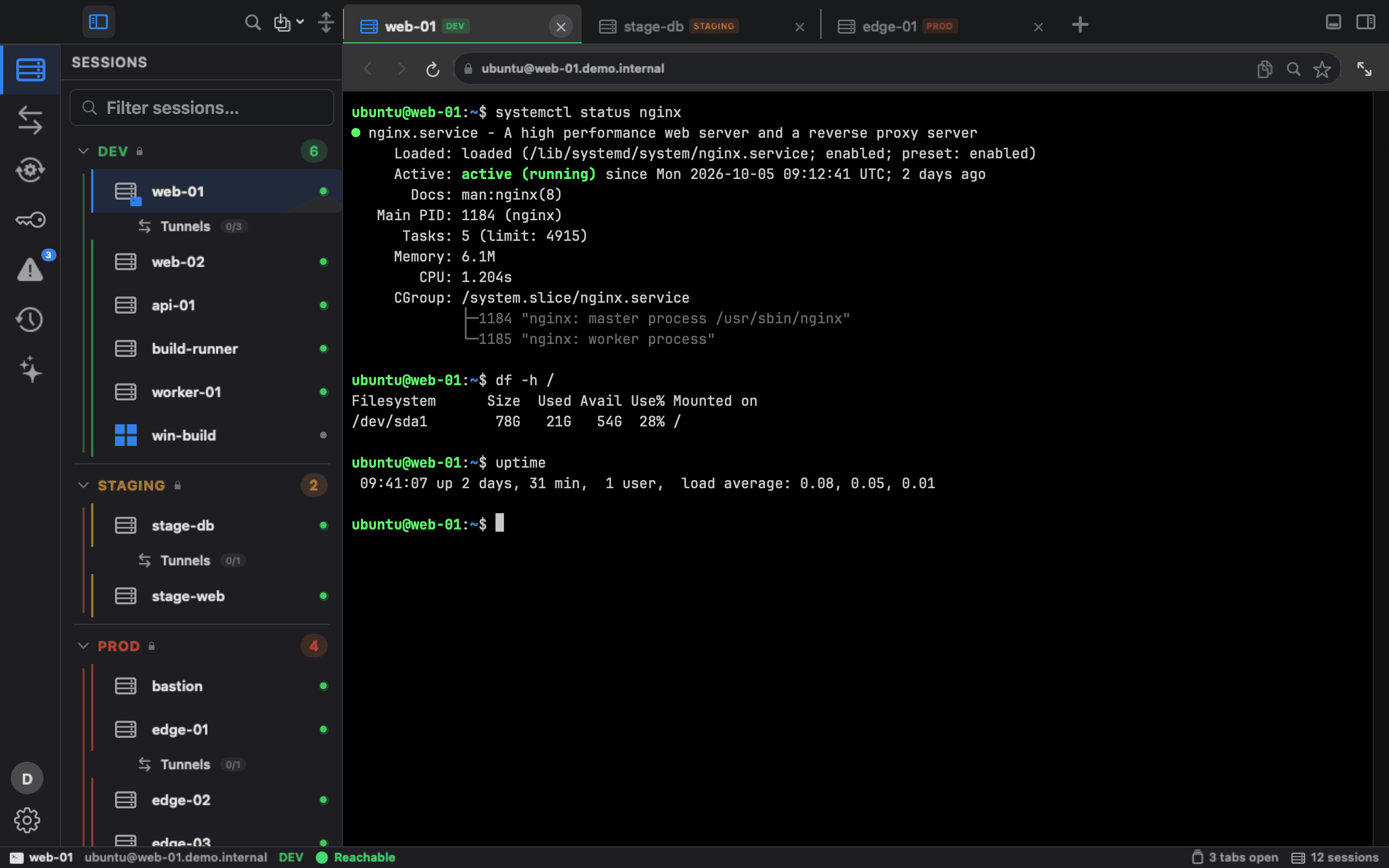
Group hosts by environment (DEV, STAGING, PROD) and into folders within each, tag them, and connect with your own ~/.ssh/config. My Mac (a terminal on this Mac) and local clusters sit under LOCAL. SSH sessions open in tabs, two side by side in split view, or in a full-screen terminal.
Your own OpenSSH
Each session is a terminal on macOS's own OpenSSH, with your ~/.ssh/config, keys and ssh-agent, as in Terminal.
Sign-in your way
Ark8 never saves an SSH login password. You type it at ssh's own prompt, or Ark8 reads it from your Vault when you connect; one you type into Ark8's own prompt for Files or a tunnel stays in memory until you quit. A sudo password you choose to save goes in the macOS Keychain and is released only after Touch ID or your Mac password.
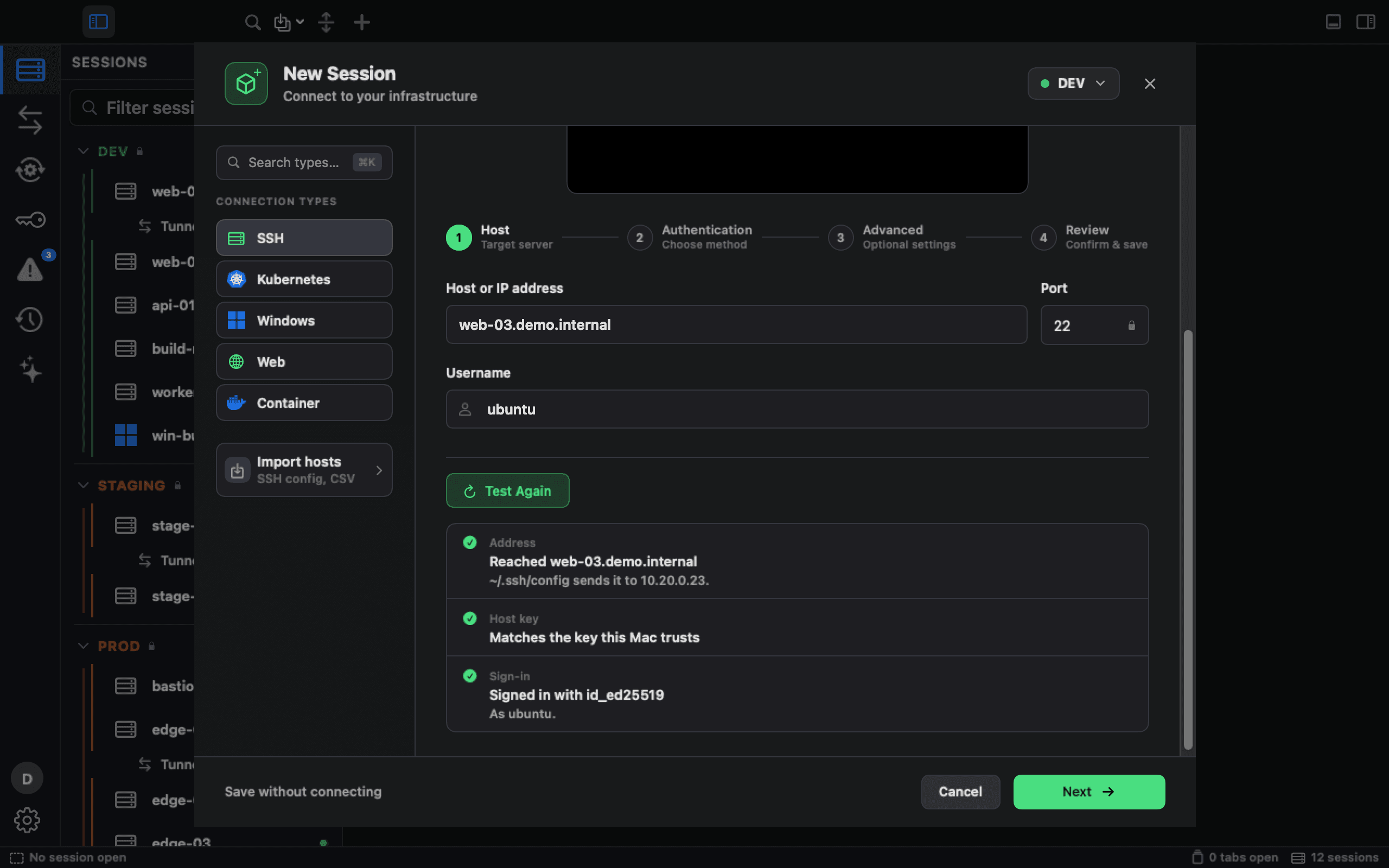
Test ConnectionNew in 1.7
In New Session and Edit Session, Test Connection checks a server's address and host key, and the sign-in when it uses keys or a Vault password, in plain words. An unknown or changed host key stops it before any key or password is offered, and it never opens a shell. For Windows it checks that the host speaks Remote Desktop and whether it requires NLA.
Connection previewsNew in 1.7
Pick a connection type in New Session and a silent six-second loop shows what that session looks like in Ark8, with demo hosts. With Reduce Motion or Low Power Mode on, you see a still.
Search and filter
Filter sessions by name, address, user, environment or tag. ⌘F searches hosts, clusters, tunnels, runbooks, Kubernetes objects and Shraga chats.
Jump hosts
Reach a host through another saved session, chained up to 8 hops. Each bastion is dialled as its own ssh and signs in as itself, with its own key (in Files also its own Vault secret or a password you type for it), and only forwards the connection, so it never sees the target's credentials. Terminals, Files, tunnels and runbooks use the route.
Host keys, handled
See and accept the fingerprint before the first connection to a PROD host, and to STAGING by default. When a key changes, a bar under the terminal offers the exact “ssh-keygen -R” fix, and the host panel says whether Ark8's records explain it, such as a Terraform destroy.
Import your fleet
Bring hosts in from a CSV, your ~/.ssh/config, or a screenshot of another tool's host list, read on your Mac.
Not included: session recording, broadcast typing, mosh and X11; choosing a port in New Session, which uses 22 for SSH and 3389 for Remote Desktop (a host imported from your ~/.ssh/config or a CSV keeps its port); a check of RDP passwords in Test Connection. The remote terminal runs bash, even when your login shell is zsh or fish.
Production safeguards
Touch ID before PROD shells, files and runs.
Before Ark8 opens a terminal, the Files browser, an RDP session, a tunnel, a Docker action over SSH or a runbook step on a PROD host, macOS asks for Touch ID or your login password. One approval lasts five minutes for that session, and a runbook step also goes ahead on a PROD host whose terminal is already open.
Touch ID or your Mac password
Macs without Touch ID ask for your login password, and with no way to authenticate, access is refused.
Typed confirmations
Type the environment's name to delete a STAGING or PROD session or a group that holds one, or to move a session into or out of STAGING or PROD. Deleting files there, or uploading them with the Upload button, asks the same.
Verified host keys
PROD never connects with an unverified host key, STAGING is blocked by default, and a Vault password is never sent to an unverified PROD host.
On the record
Every PROD approval, denial and reuse is in the Activity Log while its security events are on (the default, and turning them off is itself logged), and an import can raise a host's protection but never lower it.
Not included: a Touch ID check for web tabs; a policy an organization can enforce. The check is on by default and has no switch in Settings, but it is stored per Mac. STAGING gets typed confirmations and strict host-key checks, not Touch ID.
Files
Files on the hosts you already reach.
Browse, edit and move files over SSH, including on a host you reached from inside an Ark8 terminal.
Over SSH
Browse, edit and move files over SSH, through the host's jump hosts too, each signing in with its own key, Vault secret or a password you type for it. If a terminal to the host is open, Ark8 reuses its connection, so you don't sign in again. Downloaded files are quarantined, so macOS checks them before they open.
Edit with sudo
Open root-owned files with sudo. A sudo save keeps the file's owner and permissions, and is refused if a swapped-in link could redirect it.
Drag between servers
Drag files and folders between two servers side by side in split view; the confirmation flags a PROD destination. Drag them out to Finder to download them.
Transfer failures explainedNew in 1.7
When a transfer fails, Ark8 lists what failed, between which hosts and why, with what to do next. For a changed host key it shows the new fingerprint and offers Remove old key, which asks first on STAGING and PROD and is recorded in the Activity Log.
Needs: a POSIX shell on the server.
Not included: SFTP-only or chrooted accounts; uploading a folder from your Mac; a PROD host behind a jump host or ProxyCommand, or a STAGING one by default, until its key has been accepted in its terminal, because Files can’t check that key from this Mac; passwords for drags between servers, which sign in with your keys or agent only. The remote editor is plain text, without syntax highlighting.
Remote desktop
Windows, in a tab.
Native RDP built on FreeRDP: in a tab, in split view or full screen, resizing with your window on servers that support it. You type the password for each connection, or Ark8 fetches it from Vault; it is never saved.
Clipboard per session
Text and files, text only, or off. PROD sessions default to text only, and your Mac clipboard goes only to the session you're working in.
Files ask first
A small copy you make yourself in the active session (up to 64 MB and 100 files) goes straight through. Anything larger, or offered by another session, asks first; more than 1,000 files, or more than your Mac has room for, is refused. Files that arrive are quarantined.
A shared folder, if you want one
Sharing a Mac folder with Windows is off by default. Turn it on per session and each session gets its own private folder; STAGING and PROD warn you first.
Pinned certificates
A new certificate is shown with its SHA-256 fingerprint and pinned once you trust it, and a changed one is flagged. Ark8 only negotiates NLA or TLS, never the legacy RDP security layer.
Not included: audio, printers, smartcards, USB, multiple monitors, RemoteApp and RD Gateway. Hosts that accept only the legacy RDP security layer can't connect.
Web tabs
Internal web UIs, without another browser.
Internal consoles open in Ark8 tabs, next to the hosts and clusters they belong to. Tabs identify themselves as Safari, so management consoles don't turn them away.
From anywhere in Ark8
Open a tab from a Web session, a tunnel, a Kubernetes port-forward, a website secret or a Git remote. Tabs have back, forward and reload, and work in split view.
A cookie jar per site
Each backend gets its own cookies and storage, including services you reach through tunnels and port-forwards, so one internal tool can't read another's sign-in.
Self-signed consoles
A self-signed or internal-CA console opens only after you choose Trust for This Session. The trust is pinned to that certificate, logged, and forgotten when Ark8 quits.
Old TLS, on your call
A legacy appliance that only speaks TLS 1.0 or 1.1 opens only after you allow it for that host.
Not included: file downloads, upload pickers and JavaScript dialogs (web tabs are not a full browser). Certificate trust is asked again after Ark8 restarts.
Kubernetes
Straight to the API server.
Import any context from a kubeconfig (pasted, from a file or from ~/.kube/config) and file it under an environment. Browsing, watching, resource actions and exec go straight to the API server with your kubeconfig's credentials. Port-forwards, Helm and the optional metrics-server install use the kubectl or helm on your Mac. Cloud credentials are never sent to Ark8's servers.
Multi-cluster view
The clusters you import sit in the same sidebar as your SSH hosts, under their environment.
Workloads and events
36 built-in kinds, Helm releases and custom resources, live from the API server, with inspectors for most kinds and a live events feed. Helm releases offer rollback and uninstall.
Cloud provider auth
Works with gke-gcloud-auth-plugin, aws and kubelogin from your PATH. A cluster token can also come from Vault.
Exec and shells
Exec into a container from the drawer, or open a terminal tab that runs kubectl exec for you.
Logs and YAML
Follow pod logs from the last 500 lines, and edit and apply any object's YAML; every apply is in the Activity Log with a diff.
Actions
Scale Deployments and StatefulSets, restart, pause or resume rollouts, restart, evict or delete pods, and cordon, uncordon or drain nodes.
Overview and issues
Measured CPU and memory from metrics-server or Prometheus, and crash loops, OOM kills, pending pods and NotReady nodes flagged for you.
Sign-in programs need your OK
A kubeconfig that signs in by running a program on your Mac waits until you've seen the exact command and allowed it. Clusters imported before 1.6.1 keep the command they already ran; any change to it asks.
Needs: the provider's sign-in plugin on your Mac for GKE, EKS or AKS clusters; kubectl for port-forwards, creating from templates, the metrics-server install and the Shell buttons; helm for Helm actions. Browsing, logs, exec, YAML and the actions above need neither kubectl nor helm.
Not included: a confirmation before rollout restart, pause or resume, or before a shell or the exec console opens (on PROD each still asks for Touch ID); Deployment rollback; your own Helm repositories; importing every context at once. The in-app exec console sends one line at a time.
Tunnels
A unified port-forwarding lifecycle.
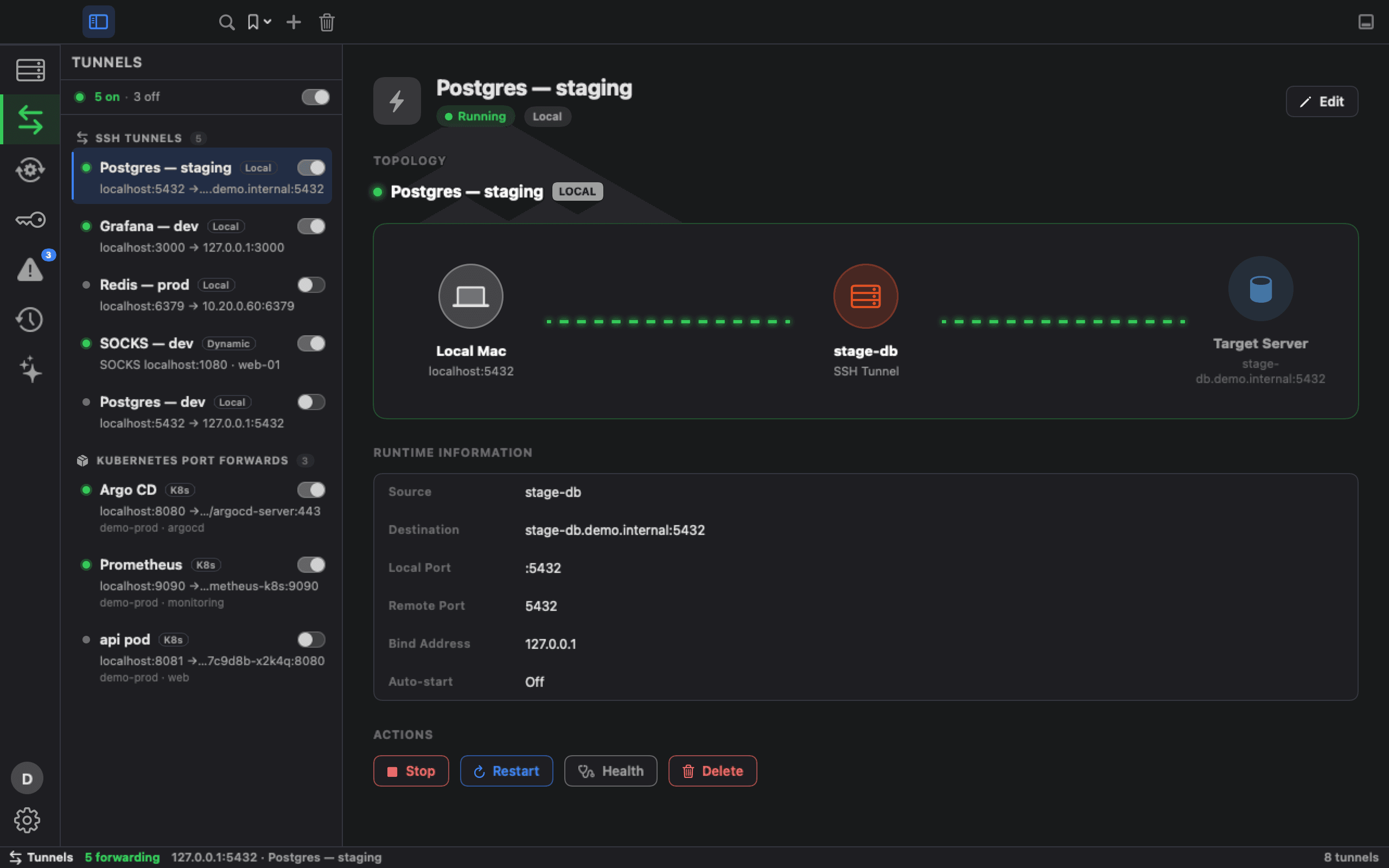
SSH port-forwards and Kubernetes port-forwards live in one manager with a shared lifecycle model. See what's active, why, and to which target.
Local, remote and dynamic
SSH -L, -R and -D tunnels, configured through one form and managed side by side.
Kubernetes port-forwards
Run through kubectl, with visible state: starting, active, stopped, or failed with kubectl's own error.
Passwords held in memory
A tunnel uses the password you typed for its session, held in memory, or reads the session's Vault secret when it starts. Ark8 never writes it anywhere.
Web-tab passthrough
When a tunnel forwards a web port, open it in an Ark8 web tab, with no switch to another browser.
Not included: automatic reconnect for tunnels or port-forwards. Kubernetes port-forwards bind to localhost.
Containers
Docker engines, next to your hosts.
Add a Docker engine from New Session and work with its containers in a tab, beside the hosts they run on.
Three ways to connect
A Docker context on this Mac, a Linux host over one of your SSH sessions, or a remote daemon over TCP, with TLS client certificates (plain TCP is allowed only for DEV engines).
Containers at a glance
List containers with their compose project, ports and health, open the inspector, and start, stop or restart them.
Shell and logs
Open a shell inside a container, or follow its logs.
Pinned SSH, PROD-aware
An engine over SSH runs through Ark8's own SSH connection, so the host key you pinned is checked, and a PROD engine over SSH asks for Touch ID. Container actions are in the Activity Log.
Needs: the docker CLI on your Mac for local and TCP engines; docker on the host, with your SSH user in the docker group, for SSH engines.
Not included: images, volumes, networks, compose up and down, removal and stats.
Runbooks
The procedure, not the wiki page.
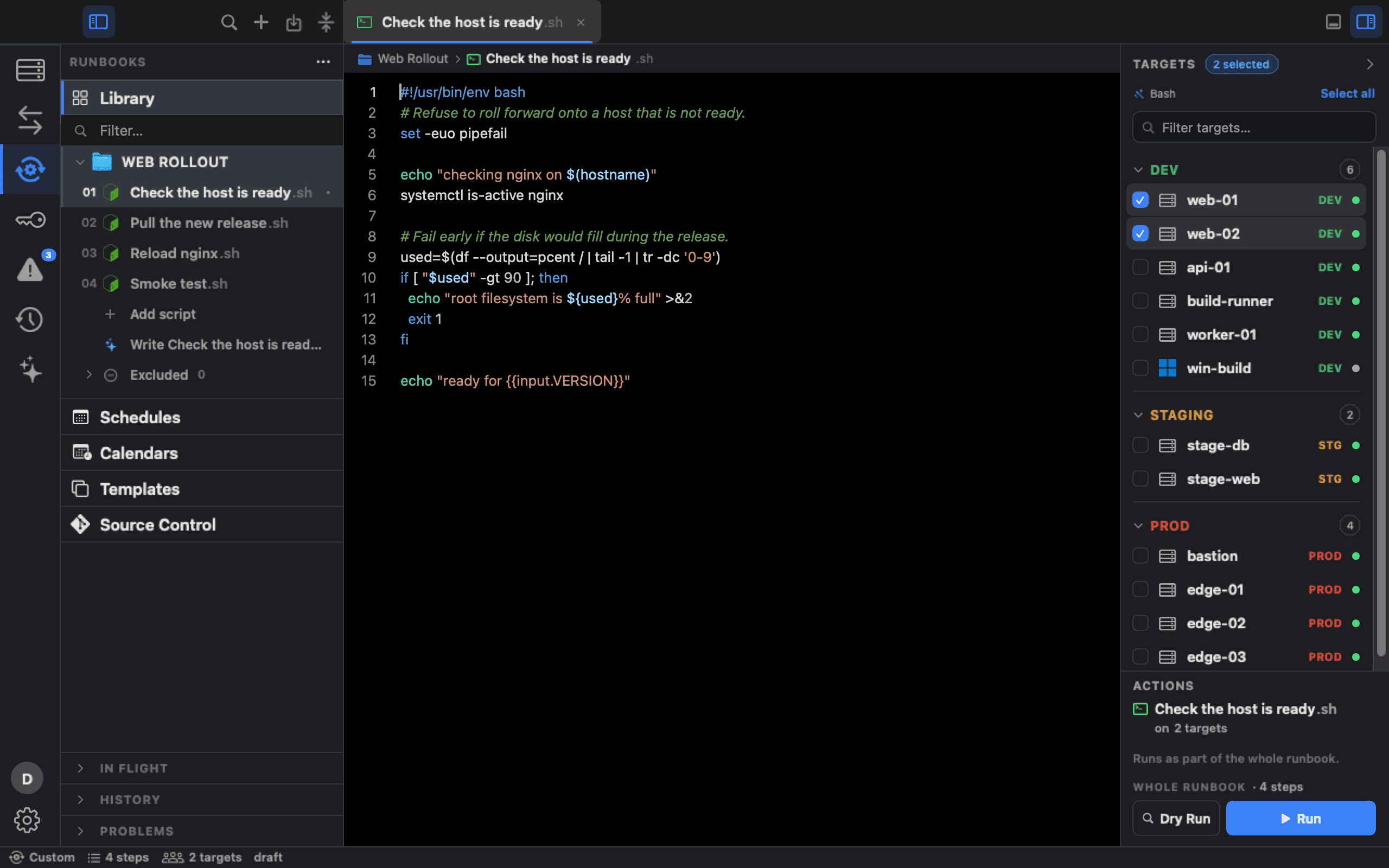
The steps someone keeps in their head become a runbook: the same commands, on the targets you choose, with a record of every run.
Bash, PowerShell, Terraform, Ansible
Bash and PowerShell run on this Mac or over SSH, Terraform on this Mac or over SSH where its state is, and Ansible over SSH where its playbook and inventory are. Each step has its own timeout and retries, and a step can call another runbook.
Plan, review, apply
Terraform Init, Plan, Apply and Destroy, on this Mac or over SSH on the host that holds the state. On this Mac, Apply refuses a saved plan that has gone stale, and Destroy asks you to type the directory's name.
Schedules and calendars
Once, on chosen days, monthly or by cron, in any time zone, while Ark8 is open and the Mac is awake; a missed run is recorded, not replayed. Calendars hold maintenance windows and change freezes from weekly windows, date ranges or one external calendar. Production is never scheduled.
Review and approval
Change Review shows what will run, where and in what order before a whole-runbook run or a Terraform Apply or Destroy. A runbook can ask for approval when it touches environments you choose (PROD is pre-selected). Approval is given on the same Mac, recorded under the Mac user's name and flagged as a self-approval.
Secrets from Vault
HashiCorp Vault resolves a secret at run time, so the runbook never holds one, and secret parameters are masked in the output.
Version control
Turn on Source Control and the library becomes a Git repository. Review each change, commit it and push it to GitHub or any Git host with your own Git credentials, without leaving the app.
Run on a GitHub runner
Hand a runbook's Bash, Python and PowerShell steps to a self-hosted runner as a GitHub Actions workflow. Ark8 writes the file, names the secrets to create without sending any, and refuses anything that would not run the same way there.
Triggers and notifications
Signed webhook triggers are rate-limited, and a GitHub-signed delivery replayed within a few minutes doesn't run twice. Notifications go to this Mac, Slack or your own webhook.
Needs: terraform and ansible-playbook where they run; an OpenSSH server on Windows hosts; git for Source Control; the gh CLI, signed in, for GitHub runners.
Not included: Python, Go, kubectl and Helm steps can be written but not run on this Mac or over SSH, and no step runs against a Kubernetes cluster. Ansible's Check and Run playbook buttons, Terraform Init, Plan, Validate and Output, and Run on GitHub Runner skip Change Review. There's no second-person or remote approval, and a schedule never waits for one: an occurrence that needs approval is skipped. Run on GitHub Runner works with github.com only, on main, with no inputs, and its result isn't in Runbook History. Schedules and webhooks need Ark8 open and the Mac awake.
Secrets
Your Vault, in Ark8.
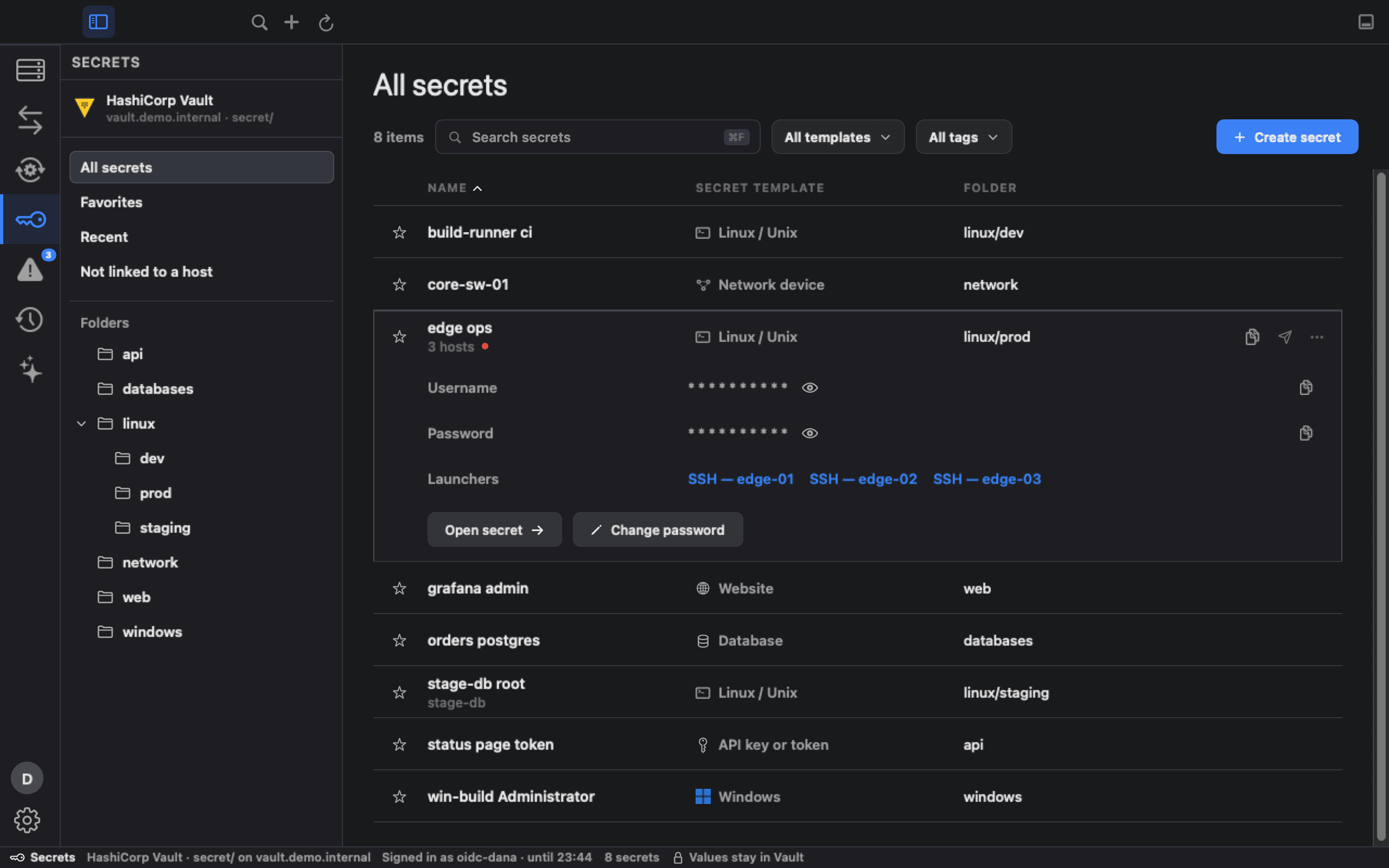
Secrets manages the secrets in your own HashiCorp Vault. Values stay in Vault until you click Show or Copy, and a copied value clears from the clipboard after 30 seconds unless you've copied something else since.
Browse without reading
Browsing never reads a value. Show, Copy and Edit each read it once. A shown value hides after 30 seconds, and a copied one stays off Universal Clipboard and is marked so clipboard managers that follow the common convention skip it.
Touch ID for PROD secrets
A secret linked to a PROD host asks for Touch ID or your Mac password before Show, Copy or Edit.
Templates and generator
Create a secret from a template, with a 24-character password generator and a strength checklist. Saving uses Vault's check-and-set, so a newer change made elsewhere isn't overwritten.
Link and launch
Link SSH or RDP sessions to a secret and launch them from it, or pick the secret in New Session. Terminals, Files, tunnels and RDP fetch the password when they connect.
Every action audited
Every reveal, copy, edit, create, delete, restore, link and unlink is in the Activity Log while its security events are on (the default), by path and field, never by value.
Restore what you deleted
Delete is a soft delete in Vault. The secret moves to Deleted, where Restore brings it back.
Change password
Change password on a secret's card saves a new value to Vault and reminds you to change it on the host too.
Sign in with your identityNew in 1.7
Sign in to Vault with its OIDC auth method in your browser, the same flow as “vault login -method=oidc”; it replaces the stored Vault token. The token stays in memory for at most four hours, and Ark8 asks Vault to revoke it when you sign out of Vault or quit (a batch token can't be revoked; it simply runs out).
Needs: your own HashiCorp Vault with a KV v2 mount, and its OIDC auth method enabled with a role by a Vault admin (Ark8 shows the setup commands).
Not included: other Vault sign-in methods such as AppRole, LDAP or userpass; more than one KV v2 mount at a time; password rotation, or changing the password on the host. Scheduled and webhook runs don't open a browser to sign in to Vault; they stop instead. While you work in an RDP session, a copied secret also reaches its Windows clipboard.
Issues and the host panel
What's wrong, next to where you work.
Ark8 points out problems it finds in data it already has, and shows a host's vital signs beside its session.
The host panel
Beside an SSH session: the host's OS facts, CPU, memory, root disk and NVIDIA GPU, load, uptime and top processes, refreshed every 30 seconds while the panel is open.
Issues
Hosts over disk or memory thresholds, broken or conflicting tunnels, sign-in problems, web tab and RDP failures, and Kubernetes problems. Acknowledge an issue, fix it with a button where one exists, or open a runbook meant for it.
Health Check
Writes a short report on a host from what Ark8 has already collected.
Real platform marks
Once probed, hosts show their distro or platform, for example Ubuntu, Debian, Red Hat or Proxmox VE.
Not included: an agent on your hosts, background monitoring, alerting or a fleet dashboard. Full metrics are collected on Linux only, and GPU means NVIDIA.
Activity Log and SIEM export
A record on every Mac.
Ark8 keeps an Activity Log on each Mac of what Ark8 opened, changed and ran, where, and by which Ark8 account. It is on by default. Export its newest 1,000 events as JSON or CSV, or stream every event to your SIEM as RFC 5424 syslog over TLS.
What's recorded
SSH sessions, PROD decisions, file opens, saves and deletes, RDP events, tunnels, Kubernetes exec and shells, logs, YAML applies, scaling, rollout restarts, pauses and resumes, Helm installs and pod deletes, Docker actions, runbook runs and approvals, Vault secret actions, settings changes and Shraga lookups.
Who did itNew in 1.7
Each new event records the signed-in Ark8 account next to the Mac user: the email, how it signed in (Google or Microsoft), the organization and the role, or Not signed in. The JSON export carries all of it; CSV export and SIEM carry the account, sign-in method and organization.
Redacted first
Values written after a label Ark8 knows (password=, token:, an Authorization header and the like) are redacted before an event is written or sent. A secret with no such label in front of it is not caught.
To your SIEM
Off until you set it up. Events go to your collector as RFC 5424 syslog over TLS or plain TCP, with structured fields such as the Ark8 account once you set your Enterprise number. Import your collector's CA to make it the only one trusted, add a client certificate for mutual TLS, and check it all with Test Connection.
Not included: keystrokes, commands typed in a terminal, or terminal output; uploads, downloads and renames. Settings ▸ Security can turn the log, or its security, file, tunnel and runbook-step events, off; each such change is recorded. History shows the newest 1,000 events, and retention is 30, 90, 180 or 365 days. The file on your Mac can be cleared (clearing is logged), and SIEM delivery is at most once.
Teams
Teams and roles, enforced by the database.
Share an SSH host from its right-click menu with everyone in your organization or with its admins only. Teammates connect with their own credentials, and a shared host opens with the environment it was shared with, so a host shared as PROD gets PROD safeguards. Everyone signs in with a Google or Microsoft account, and the database enforces four organization roles.
Google or Microsoft sign-in
Sign in with a Google or Microsoft account through macOS's system sign-in sheet. PKCE only; no client secret in the app.
Four rolesNew in 1.7
Owner, Admin, Member and Viewer, enforced by the database for your organization's data. Only the Owner can make someone an Admin or transfer ownership. Ark8 for macOS re-checks your role at launch, when it comes to the front, every 5 minutes, and before an organization action if the last check is over a minute old.
InvitationsNew in 1.7
Admins invite people by email with a role and an expiry. Ark8 emails each person their link, or shows it for you to send when email isn’t available. To join, that person opens the link, signs in on the Ark8 website with the invited, verified email and presses Accept, or Decline. Signing in alone never joins. Resend or revoke it.
Owner-controlled
Only the person who shared a host can change its name, address and other details, or stop sharing it. The Owner and Admins can relabel its environment or withdraw it in the web admin console; a stricter label also raises the sharer's copy, and a later environment change or re-share from the sharer's Mac replaces it. If your role or membership changes so that you may no longer open a shared host, or its environment becomes stricter, Ark8 closes the tabs you opened from it.
Who sees what
Shares to everyone reach every role; admins-only shares reach Owners and Admins. A shared PROD host opens only for Owners and Admins unless the Owner lets Members open it too. A Viewer sees what's shared with everyone but can't share it or open it.
Descriptor-only wire
A shared host sends its name, address, port, username, environment, tags and notes. Ark8 never uploads a password, key, kubeconfig or token.
Append-only audit
The organization audit log is append-only and records member, invitation, role, group, ownership and sharing changes, with secret-named fields redacted as each entry is written. Admins read it in the web admin console.
Database-enforced isolation
Cross-tenant isolation is enforced by the database for every row, not by client-side filtering, and covered by the database test suite. Internal database functions are closed to clients.
Not included: sharing clusters, tunnels, credentials, Vault secrets or runbooks (runbooks travel through your own Git remote); sign-in with accounts other than Google or Microsoft; sign-ins in the organization audit log. On the Mac, a role is Ark8's policy, not a lock on the host: the SSH credentials are each person's own.
Shraga, the AI assistant
Ask about your infrastructure.
Shraga, Ark8's AI assistant, answers questions about your infrastructure from what Ark8 already knows. It uses your own Anthropic API key, sends nothing until you agree to what it may share, replaces names with labels by default, leaves PROD out unless you include it, and runs nothing.
Answers from Ark8's data
Shraga looks things up in your sessions, host metrics and inventory, tunnels, clusters and workloads, Activity Log entries and runbooks.
Drafts, never runs
A runbook step Shraga proposes is added only when you press Insert. In a new script, ⌘I drafts one in the editor that you Keep or Discard.
Strict by default
Strict mode replaces the host names, IP addresses, usernames and session, cluster and namespace names Ark8 knows with labels such as host-A before anything is sent. In both modes a filter removes values written next to a label it knows, such as password=, and you can see every substitution.
Your key, your consent
Nothing is sent until you accept a disclosure that lists what can and can't be sent, and you can revoke it. Requests go from your Mac straight to Anthropic, billed to your own account. Every lookup, script request and failed request is in the Activity Log.
Needs: your own Anthropic API key.
Not included: reading terminal output, files, the Keychain or Vault; other AI providers or a hosted AI. Strict mode can miss a name that appears only inside a script or note, and the filter can miss a secret with no label in front of it.
Settings
Settings, inside the main window.
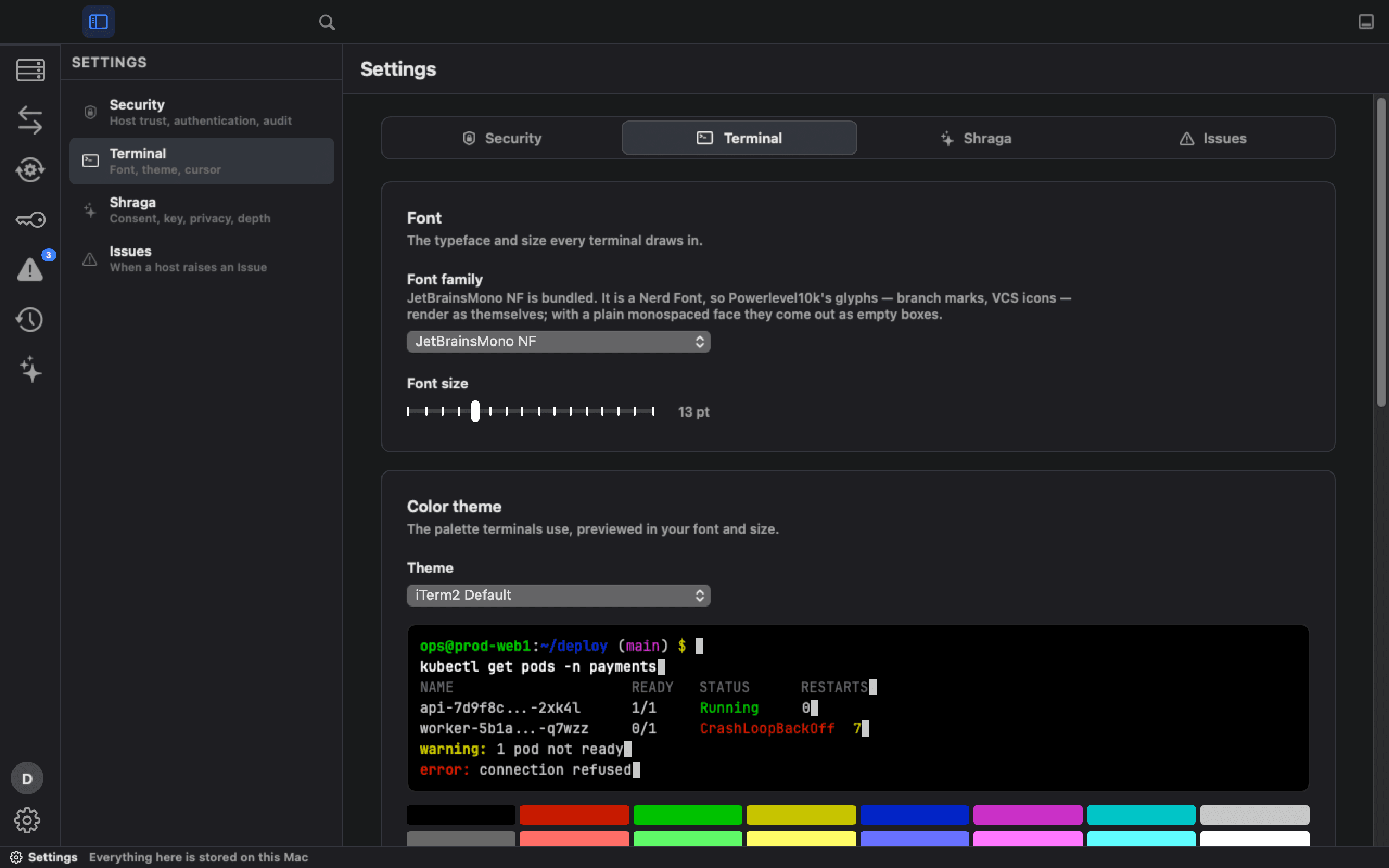
Press ⌘, or the gear at the bottom left, and Settings opens inside the main window rather than in a separate one.
A tab per areaNew in 1.7
Tabs for Security, Terminal, Shraga and Issues, with every group on a card that says in one line what it does.
Security
Host-key trust for STAGING and PROD, key-only SSH sign-in, agent forwarding, saved sudo passwords, the Activity Log, SIEM export, your Vault connection, and whether Ark8 checks for updates on its own. Turning off a critical protection asks you to confirm and is logged.
Terminal
Font size, color themes or colors imported from your iTerm2 profiles, cursor shape and blink, and Option as Meta.
Shraga and Issues
Shraga's consent, API key, privacy mode, readable environments and response depth. Warning and critical thresholds for CPU, memory and disk.
Not included: settings pushed to your Mac by an organization admin (the one organization rule Ark8 for macOS applies is who may open shared PROD hosts); a switch to turn off the PROD Touch ID check. Runbook triggers and notifications are set in each runbook.
Ready to try?
Free during the preview. Download the macOS app and sign in with Google or Microsoft to start. Nothing in your inventory is uploaded to Ark8's servers unless you share it.